Shrine Theme Pro (Shopify Theme) [Removed]

Status
This content is read-only, or is not open for further replies.

Frawg

Supreme Overlord

offline

Posts

258

Likes

3,260

Resources

58

Bits Credits

46

LEVEL

10

2,860 XP

Someone fixed the issue? In the meantime, I've directly redirected customers to the cart instead of the drawer, and it's working for now, so it's sufficient for me at the moment. But if you have an update, I'm interested
This is a good way to get around it currently! I'll keep a lookout for a fix, and if I find one, I'll upload it to the forums. If anyone else finds a fix, please feel free to upload it!
 
offline

Posts

1

Likes

2

Bits Credits

0

LEVEL

0

60 XP

Hello. This is a Shrine 1.3.5 version. But it requires a license. If anyone knows how to hack it, I would be very grateful
 

Attachments

  • Shrine.zip
    896 KB · Views: 348
offline

Posts

1

Likes

4

Bits Credits

0

LEVEL

0

60 XP

Ok, so here is a working nulled Shrine Pro v1.0.4 theme. The only issue is the "update quantity" in the cart and cart drawer. There's some issue that I can't figure out how to fix. It would be nice if someone else could have a look as well and try debug.
 

Attachments

  • Shrine Pro V1.0.4.zip
    991.6 KB · Views: 492
offline

Posts

24

Likes

58

Bits Credits

0

LEVEL

0

175 XP

I couldn't get the Pro version to work, so I decided to take the regular Shrine version 1.3.5 which didn't had the cart issue. Fix the issues that it had. And I've implemented some elements and styles from the Pro version. The final result seems bug-free and looks really good in my opinion.
Here's a breakdown:

Section Added:
- Section Divider

Blocks Added:
- Sizing Chart
- Rating Stars
- Cart Countdown Timer

Bug Fixes:
- Cart Button getting focus (black border)
- Main Add To Cart button not rendering half of the time (bug in jquery.js --> no dependencies found except slick.min.js --> both commented in theme.liquid without negative effect on theme it seems)
- Fix to show some space at the end of sliders
- Removed hover effect on quantity breaks/collapsible content on mobile and tablet

Modifications:
- Secondary Upsell styled like footer upsell in PRO
- Menu text set to bold
.header .list-menu__item {
font-weight: normal;
}
in header custom css if like the original better.
-Powered by shrine removed in footer by default
-Reduced size of quantity buttons in the cart.
-Full width/no border Cart Drawer on mobile like in Pro

Virus Total scan :

Thank you to the NullForums community for providing a platform to discuss and resolve the problem.
 

Attachments

  • Shrine+1.3.5.zip
    917.3 KB · Views: 1,451
offline

Posts

2

Likes

1

Bits Credits

0

LEVEL

0

60 XP

I couldn't get the Pro version to work, so I decided to take the regular Shrine version 1.3.5 which didn't had the cart issue. Fix the issues that it had. And I've implemented some elements and styles from the Pro version. The final result seems bug-free and looks really good in my opinion.
Here's a breakdown:

Section Added:
- Section Divider

Blocks Added:
- Sizing Chart
- Rating Stars
- Cart Countdown Timer

Bug Fixes:
- Cart Button getting focus (black border)
- Main Add To Cart button not rendering half of the time (bug in jquery.js --> no dependencies found except slick.min.js --> both commented in theme.liquid without negative effect on theme it seems)
- Fix to show some space at the end of sliders
- Removed hover effect on quantity breaks/collapsible content on mobile and tablet

Modifications:
- Secondary Upsell styled like footer upsell in PRO
- Menu text set to bold
.header .list-menu__item {
font-weight: normal;
}
in header custom css if like the original better.
-Powered by shrine removed in footer by default
-Reduced size of quantity buttons in the cart.
-Full width/no border Cart Drawer on mobile like in Pro

Virus Total scan :

Thank you to the NullForums community for providing a platform to discuss and resolve the problem.
Bro is a legend
 

Frawg

Supreme Overlord
offline

Posts

258

Likes

3,260

Resources

58

Bits Credits

46

LEVEL

10

2,860 XP

Frawg updated Shrine Theme Pro (Shopify Theme) with a new update entry:

Shrine PRO Theme Version 1.3.5 (Nulled By AZERTYTOP)

Thanks to AZERTYTOP for the contribution and discussions of this null!
You can read more about their post and resolutions here

Section Added:​

- Section Divider

Blocks Added:​

- Sizing Chart
- Rating Stars
- Cart Countdown Timer

Bug Fixes:​

- Cart Button getting focus (black border)
- Main Add To Cart button not rendering...

Read the rest of this update entry...
 

FateKid

Devil Did It
offline

Posts

16,226

Likes

372,145

Resources

3,061

Bits Credits

1,034

LEVEL

11

6,835 XP

I couldn't get the Pro version to work, so I decided to take the regular Shrine version 1.3.5 which didn't had the cart issue. Fix the issues that it had. And I've implemented some elements and styles from the Pro version. The final result seems bug-free and looks really good in my opinion.
Here's a breakdown:

Section Added:
- Section Divider

Blocks Added:
- Sizing Chart
- Rating Stars
- Cart Countdown Timer

Bug Fixes:
- Cart Button getting focus (black border)
- Main Add To Cart button not rendering half of the time (bug in jquery.js --> no dependencies found except slick.min.js --> both commented in theme.liquid without negative effect on theme it seems)
- Fix to show some space at the end of sliders
- Removed hover effect on quantity breaks/collapsible content on mobile and tablet

Modifications:
- Secondary Upsell styled like footer upsell in PRO
- Menu text set to bold
.header .list-menu__item {
font-weight: normal;
}
in header custom css if like the original better.
-Powered by shrine removed in footer by default
-Reduced size of quantity buttons in the cart.
-Full width/no border Cart Drawer on mobile like in Pro

Virus Total scan :

Thank you to the NullForums community for providing a platform to discuss and resolve the problem.
I've added the post to the original resource view, along with tags of the contribution in the update notes.
 
offline

Posts

3

Likes

6

Bits Credits

0

LEVEL

0

60 XP

I couldn't get the Pro version to work, so I decided to take the regular Shrine version 1.3.5 which didn't had the cart issue. Fix the issues that it had. And I've implemented some elements and styles from the Pro version. The final result seems bug-free and looks really good in my opinion.
Here's a breakdown:

Section Added:
- Section Divider

Blocks Added:
- Sizing Chart
- Rating Stars
- Cart Countdown Timer

Bug Fixes:
- Cart Button getting focus (black border)
- Main Add To Cart button not rendering half of the time (bug in jquery.js --> no dependencies found except slick.min.js --> both commented in theme.liquid without negative effect on theme it seems)
- Fix to show some space at the end of sliders
- Removed hover effect on quantity breaks/collapsible content on mobile and tablet

Modifications:
- Secondary Upsell styled like footer upsell in PRO
- Menu text set to bold
.header .list-menu__item {
font-weight: normal;
}
in header custom css if like the original better.
-Powered by shrine removed in footer by default
-Reduced size of quantity buttons in the cart.
-Full width/no border Cart Drawer on mobile like in Pro

Virus Total scan :

Thank you to the NullForums community for providing a platform to discuss and resolve the problem.
Simply sensational, thank you very much for what you did.
 
Liked by:

Frawg

Supreme Overlord
offline

Posts

258

Likes

3,260

Resources

58

Bits Credits

46

LEVEL

10

2,860 XP

I couldn't get the Pro version to work, so I decided to take the regular Shrine version 1.3.5 which didn't had the cart issue. Fix the issues that it had. And I've implemented some elements and styles from the Pro version. The final result seems bug-free and looks really good in my opinion.
Here's a breakdown:

Section Added:
- Section Divider

Blocks Added:
- Sizing Chart
- Rating Stars
- Cart Countdown Timer

Bug Fixes:
- Cart Button getting focus (black border)
- Main Add To Cart button not rendering half of the time (bug in jquery.js --> no dependencies found except slick.min.js --> both commented in theme.liquid without negative effect on theme it seems)
- Fix to show some space at the end of sliders
- Removed hover effect on quantity breaks/collapsible content on mobile and tablet

Modifications:
- Secondary Upsell styled like footer upsell in PRO
- Menu text set to bold
.header .list-menu__item {
font-weight: normal;
}
in header custom css if like the original better.
-Powered by shrine removed in footer by default
-Reduced size of quantity buttons in the cart.
-Full width/no border Cart Drawer on mobile like in Pro

Virus Total scan :

Thank you to the NullForums community for providing a platform to discuss and resolve the problem.
You’re phenomenal. Thank you for your contribution!
 
offline

Posts

8

Likes

0

Bits Credits

0

LEVEL

0

60 XP

hi compared to prices and sales on item dont seen on cart and checkout page which may effect cvrs, do you have any solution about it, for instance total price is 50 i made 50 percent off and priced dropped to 25 is not seen on cart and checkout page, AZERTYTOP
 
Liked by:
offline

Posts

24

Likes

58

Bits Credits

0

LEVEL

0

175 XP

Liked by:
offline

Posts

24

Likes

58

Bits Credits

0

LEVEL

0

175 XP

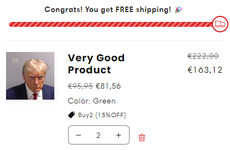
It seems that version 1.3.5 was built like that. Its the same for the Lite Shrine version : https://shrine-lite.myshopify.com/products/earwax-otoscopeView attachment 36595
I think I found a good fix.
- For the cart drawer go to theme code / snippets / cart-drawer.liquid, line 255. Select the whole "cart-item__price-wrapper" div and replace it with the following code.
- If ur gonna use the basic cart page go to theme code / section / main-cart-items.liquid, line 179. Select the whole "cart-item__price-wrapper" div and replace it with the following code.

<div class="cart-item__price-wrapper">
{%- if item.variant.compare_at_price != blank -%}
<div class="cart-item__discounted-prices">
<span class="visually-hidden">
{{ 'products.product.price.regular_price' | t }}
</span>
<s class="cart-item__old-price price price--end">
{{ item.variant.compare_at_price | times: item.quantity | money }}
</s>
<span class="visually-hidden">
{{ 'products.product.price.sale_price' | t }}
</span>
<span class="price price--end">
{{ item.final_line_price | money }}
</span>
</div>
{%- elsif item.original_line_price != item.final_line_price -%}
<div class="cart-item__discounted-prices">
<span class="visually-hidden">
{{ 'products.product.price.regular_price' | t }}
</span>
<s class="cart-item__old-price price price--end">
{{ item.original_line_price | money }}
</s>
<span class="visually-hidden">
{{ 'products.product.price.sale_price' | t }}
</span>
<span class="price price--end">
{{ item.final_line_price | money }}
</span>
</div>
{%- else -%}
<span class="price price--end">
{{ item.original_line_price | money }}
</span>
{%- endif -%}

{%- if item.variant.available and item.unit_price_measurement -%}
<div class="unit-price caption">
<span class="visually-hidden">{{ 'products.product.price.unit_price' | t }}</span>
{{ item.variant.unit_price | money }}
<span aria-hidden="true">/</span>
<span class="visually-hidden"
>&nbsp;{{ 'accessibility.unit_price_separator' | t }}&nbsp;</span
>
{%- if item.variant.unit_price_measurement.reference_value != 1 -%}
{{- item.variant.unit_price_measurement.reference_value -}}
{%- endif -%}
{{ item.variant.unit_price_measurement.reference_unit }}
</div>
{%- endif -%}
</div>

If you added a compare price it will show the compare price. If not it wont show anything, except if you have configured an automatic discount where it will show the original price on top of the discounted price + the individual discounted price if you have more than one of the same product in your cart.

Make sure to test it in depth and tell me what you think.
 

Attachments

  • undefined - Imgur (1).png
    undefined - Imgur (1).png
    6.2 KB · Views: 445
  • undefined - Imgur.png
    undefined - Imgur.png
    26.4 KB · Views: 462

returnoflegend

User Suspended
offline

Posts

1

Likes

0

Bits Credits

0

LEVEL

0

60 XP

Member suspended from NullForums
I couldn't get the Pro version to work, so I decided to take the regular Shrine version 1.3.5 which didn't had the cart issue. Fix the issues that it had. And I've implemented some elements and styles from the Pro version. The final result seems bug-free and looks really good in my opinion.
Here's a breakdown:

Section Added:
- Section Divider

Blocks Added:
- Sizing Chart
- Rating Stars
- Cart Countdown Timer

Bug Fixes:
- Cart Button getting focus (black border)
- Main Add To Cart button not rendering half of the time (bug in jquery.js --> no dependencies found except slick.min.js --> both commented in theme.liquid without negative effect on theme it seems)
- Fix to show some space at the end of sliders
- Removed hover effect on quantity breaks/collapsible content on mobile and tablet

Modifications:
- Secondary Upsell styled like footer upsell in PRO
- Menu text set to bold
.header .list-menu__item {
font-weight: normal;
}
in header custom css if like the original better.
-Powered by shrine removed in footer by default
-Reduced size of quantity buttons in the cart.
-Full width/no border Cart Drawer on mobile like in Pro

Virus Total scan :

Thank you to the NullForums community for providing a platform to discuss and resolve the problem.
It works! Thank you so much
 
Liked by:
offline

Posts

1

Likes

0

Bits Credits

0

LEVEL

0

60 XP

I couldn't get the Pro version to work, so I decided to take the regular Shrine version 1.3.5 which didn't had the cart issue. Fix the issues that it had. And I've implemented some elements and styles from the Pro version. The final result seems bug-free and looks really good in my opinion.
Here's a breakdown:

Section Added:
- Section Divider

Blocks Added:
- Sizing Chart
- Rating Stars
- Cart Countdown Timer

Bug Fixes:
- Cart Button getting focus (black border)
- Main Add To Cart button not rendering half of the time (bug in jquery.js --> no dependencies found except slick.min.js --> both commented in theme.liquid without negative effect on theme it seems)
- Fix to show some space at the end of sliders
- Removed hover effect on quantity breaks/collapsible content on mobile and tablet

Modifications:
- Secondary Upsell styled like footer upsell in PRO
- Menu text set to bold
.header .list-menu__item {
font-weight: normal;
}
in header custom css if like the original better.
-Powered by shrine removed in footer by default
-Reduced size of quantity buttons in the cart.
-Full width/no border Cart Drawer on mobile like in Pro

Virus Total scan :

Thank you to the NullForums community for providing a platform to discuss and resolve the problem.
Legend, appreciate your work. Ty <3
 
Liked by:
offline

Posts

8

Likes

0

Bits Credits

0

LEVEL

0

60 XP

thank you brother ! it works fine but main cart page code is not working but doesnt matter. love you, havent tried upsells i ll let you know.
 
Liked by:
Status
This content is read-only, or is not open for further replies.
Top Bottom