Shrine Theme Pro (Shopify Theme) [Removed]

Status
This content is read-only, or is not open for further replies.
offline

Posts

1

Likes

0

Bits Credits

0

LEVEL

0

60 XP

I think I found a good fix.
- For the cart drawer go to theme code / snippets / cart-drawer.liquid, line 255. Select the whole "cart-item__price-wrapper" div and replace it with the following code.
- If ur gonna use the basic cart page go to theme code / section / main-cart-items.liquid, line 179. Select the whole "cart-item__price-wrapper" div and replace it with the following code.

<div class="cart-item__price-wrapper">
{%- if item.variant.compare_at_price != blank -%}
<div class="cart-item__discounted-prices">
<span class="visually-hidden">
{{ 'products.product.price.regular_price' | t }}
</span>
<s class="cart-item__old-price price price--end">
{{ item.variant.compare_at_price | times: item.quantity | money }}
</s>
<span class="visually-hidden">
{{ 'products.product.price.sale_price' | t }}
</span>
<span class="price price--end">
{{ item.final_line_price | money }}
</span>
</div>
{%- elsif item.original_line_price != item.final_line_price -%}
<div class="cart-item__discounted-prices">
<span class="visually-hidden">
{{ 'products.product.price.regular_price' | t }}
</span>
<s class="cart-item__old-price price price--end">
{{ item.original_line_price | money }}
</s>
<span class="visually-hidden">
{{ 'products.product.price.sale_price' | t }}
</span>
<span class="price price--end">
{{ item.final_line_price | money }}
</span>
</div>
{%- else -%}
<span class="price price--end">
{{ item.original_line_price | money }}
</span>
{%- endif -%}

{%- if item.variant.available and item.unit_price_measurement -%}
<div class="unit-price caption">
<span class="visually-hidden">{{ 'products.product.price.unit_price' | t }}</span>
{{ item.variant.unit_price | money }}
<span aria-hidden="true">/</span>
<span class="visually-hidden"
>&nbsp;{{ 'accessibility.unit_price_separator' | t }}&nbsp;</span
>
{%- if item.variant.unit_price_measurement.reference_value != 1 -%}
{{- item.variant.unit_price_measurement.reference_value -}}
{%- endif -%}
{{ item.variant.unit_price_measurement.reference_unit }}
</div>
{%- endif -%}
</div>

If you added a compare price it will show the compare price. If not it wont show anything, except if you have configured an automatic discount where it will show the original price on top of the discounted price + the individual discounted price if you have more than one of the same product in your cart.

Make sure to test it in depth and tell me what you think.
Hi Azertyop,

Thank you very much for your contribution.

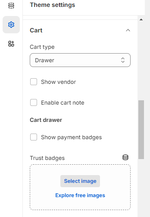
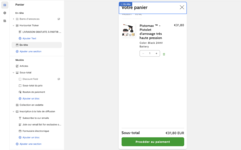
Do you know why I can't modify my cart drawer? It's the basic cart drawer and I can't add any features (like the delivery bar, upsell...).

Thank you very much Capture d’écran 2024-04-02 à 00.46.58.png
 
Liked by:

Deleted member 85552

Guest
offline
I've added the post to the original resource view, along with tags of the contribution in the update notes.
I think I managed to get it working, but I would like you to check it, can I send you the file?
 
Liked by:
offline

Posts

24

Likes

58

Bits Credits

0

LEVEL

0

175 XP

Hi Azertyop,

Thank you very much for your contribution.

Do you know why I can't modify my cart drawer? It's the basic cart drawer and I can't add any features (like the delivery bar, upsell...).

Thank you very much View attachment 36684

You need to go into theme settings to customize your cart in the normal Shrine version.
 

Attachments

  • ificXo9.png
    ificXo9.png
    22.8 KB · Views: 202
Liked by:
offline

Posts

24

Likes

58

Bits Credits

0

LEVEL

0

175 XP

thank you brother ! it works fine but main cart page code is not working but doesnt matter. love you, havent tried upsells i ll let you know.
You're welcome brother. Main cart page fix is working on my end, but we're all gonna use the drawer anyways so as you said : doesn't matter.
 
Liked by:
offline

Posts

1

Likes

0

Bits Credits

0

LEVEL

0

110 XP

Nice ! The error don't seem to appear when using quantity breaks or clicking on quick add in collection page. It shouldn't be hard to fix.
yeah pls fix it so we have a complete theme working
 
Liked by:
offline

Posts

1

Likes

0

Bits Credits

0

LEVEL

0

60 XP

Nice ! The error don't seem to appear when using quantity breaks or clicking on quick add in collection page. It shouldn't be hard to fix.
Thanks you so much for the theme, you have no ideas how much time you have saved for us, you should provide a Buymecoffee link you deserve some free coffees
 
Liked by:

Deleted member 85552

Guest
offline
I finally gave up, I don't know anything about code and I was trying for too long. I bought the shrine pro for 40 dollars, at the moment it works correctly.
 
Liked by:

ikaysa

User Suspended
offline

Posts

1

Likes

0

Bits Credits

0

LEVEL

0

80 XP

Member suspended from NullForums
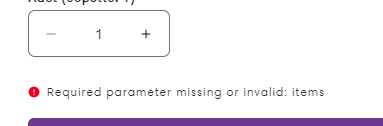
At the moment everything works, there is not a single point that is problematic or not working, but there is only one problem, when I add to cart I get this error. I hope you can fix it. AZERTYTOP

Screenshot_2.png
 
Liked by:
offline

Posts

24

Likes

58

Bits Credits

0

LEVEL

0

175 XP

Thanks you so much for the theme, you have no ideas how much time you have saved for us, you should provide a Buymecoffee link you deserve some free coffees
Thanks for the kind words bro. I'm glad I could help!
 

Attachments

  • bmc_qr.png
    bmc_qr.png
    86 KB · Views: 49
offline

Posts

24

Likes

58

Bits Credits

0

LEVEL

0

175 XP

I finally gave up, I don't know anything about code and I was trying for too long. I bought the shrine pro for 40 dollars, at the moment it works correctly.
I understand. Thanks anyway for your contribution!
 
Liked by:
offline

Posts

1

Likes

0

Bits Credits

0

LEVEL

0

60 XP

At the moment everything works, there is not a single point that is problematic or not working, but there is only one problem, when I add to cart I get this error. I hope you can fix it. AZERTYTOP

View attachment 36722
The strange thing is that I still use it normally at the old store, it only appears when I move to the new store. Haiza :(
 
Liked by:
offline

Posts

5

Likes

5

Bits Credits

0

LEVEL

0

60 XP

I'm in no way good at coding at all to understand what I need to do, is there just a working version I can just download without having to modify it myself?
 
Liked by:
offline

Posts

2

Likes

0

Bits Credits

0

LEVEL

0

60 XP

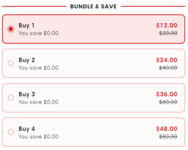
AZERTYTOP Thanks so much for the Shrine theme! I've noticed a bug when using quantity breaks where the amount saved is stuck at $0. I've tried the default [amount] and [amount_saved] as well. Do you know the proper text to get it working? Thanks again!
 

Attachments

  • Screenshot 2024-04-04 015052.png
    Screenshot 2024-04-04 015052.png
    18.6 KB · Views: 184
Liked by:
offline

Posts

1

Likes

0

Bits Credits

0

LEVEL

0

60 XP

Sonunda pes ettim, kod hakkında hiçbir şey bilmiyorum ve çok uzun zamandır uğraşıyordum. Shrine pro'yu 40 dolara aldım, şu anda düzgün çalışıyor.
Can you share that with us?
 
Liked by:
offline

Posts

3

Likes

1

Bits Credits

0

LEVEL

0

60 XP

I couldn't get the Pro version to work, so I decided to take the regular Shrine version 1.3.5 which didn't had the cart issue. Fix the issues that it had. And I've implemented some elements and styles from the Pro version. The final result seems bug-free and looks really good in my opinion.
Here's a breakdown:

Section Added:
- Section Divider

Blocks Added:
- Sizing Chart
- Rating Stars
- Cart Countdown Timer

Bug Fixes:
- Cart Button getting focus (black border)
- Main Add To Cart button not rendering half of the time (bug in jquery.js --> no dependencies found except slick.min.js --> both commented in theme.liquid without negative effect on theme it seems)
- Fix to show some space at the end of sliders
- Removed hover effect on quantity breaks/collapsible content on mobile and tablet

Modifications:
- Secondary Upsell styled like footer upsell in PRO
- Menu text set to bold
.header .list-menu__item {
font-weight: normal;
}
in header custom css if like the original better.
-Powered by shrine removed in footer by default
-Reduced size of quantity buttons in the cart.
-Full width/no border Cart Drawer on mobile like in Pro

Virus Total scan :

Thank you to the NullForums community for providing a platform to discuss and resolve the problem.
awesome i try this it has no problem to items when you wants add to cart. do you solve this problem with pro version or not my friend ? thanks for you hard work
 
Liked by:
Status
This content is read-only, or is not open for further replies.
Top Bottom