
- Compatible versions
- 4.6, 4.7
IPS applications and plugins require you to extract the .TAR or .XML content from the zip archive before installing.
This plugin will display products from your Invision Community Commerce Store in a widget block using an image carousel.
You can choose to display either New Products or Featured Products and set the groups allowed to view the widget block.
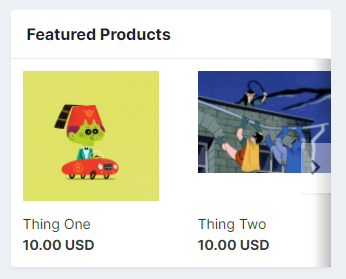
Featured store items are set in the Commerce app and that is where this block will pull from. When you edit a product, go to the store settings tab. The toggle to feature the item on the store index page is the one you want.
New store items are a setting in Commerce that allows you to set the number of days back a product is considered "new" to the store and also the maximum number of items to falg as new. Whatever products fall under those settings will appear in the widget.
Most sites use the featured option as new items don't usually get added into the store on a daily, if not weekly, basis, so even if you set the lookback to 30 days for new, you run the risk of an empty widget.
Requires Invision Community Commerce obviously.
The carousel will not turn on unless you have more products than will fit inside the widget. It also will not magically turn on if you shrink your browser width. The carousel determines itself whether to enable or not when the page is first loaded.
Outside of that, that's pretty much it.
You can choose to display either New Products or Featured Products and set the groups allowed to view the widget block.
Featured store items are set in the Commerce app and that is where this block will pull from. When you edit a product, go to the store settings tab. The toggle to feature the item on the store index page is the one you want.
New store items are a setting in Commerce that allows you to set the number of days back a product is considered "new" to the store and also the maximum number of items to falg as new. Whatever products fall under those settings will appear in the widget.
Most sites use the featured option as new items don't usually get added into the store on a daily, if not weekly, basis, so even if you set the lookback to 30 days for new, you run the risk of an empty widget.
Requires Invision Community Commerce obviously.
The carousel will not turn on unless you have more products than will fit inside the widget. It also will not magically turn on if you shrink your browser width. The carousel determines itself whether to enable or not when the page is first loaded.
Outside of that, that's pretty much it.


![ComplexTurrets | Defend Yourself using Turrets! [1.8-26.2]](/data/resource_icons/1/1230.jpg?1673047672)