
Description
Add 6 Objects, 18 NPCs, 3 Items, and 2 Admin Tools to your game!
This pack includes Core Assets of the ultimate Essentials Series, perfect for any server from any category.
Using MythicMobs x DeluxeMenus, every Object, NPC, and Item includes a premade function or menu - which are of course fully customizable to suit your preferences.
Attach quests to NPCs, use your favorite storage plugin on the Storage Chest, customize your Merchant Shops!
 This pack contains:
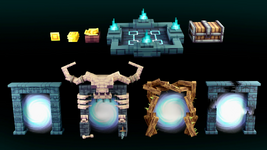
- 6 Objects:
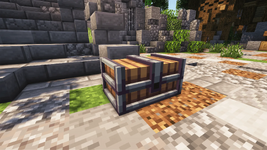
- Storage Chest
- Right-click to Open Storage
- /enderchest from EssentialsX has been used in the video
- Waypoint Gate
- Right-click to open the Waypoint Menu
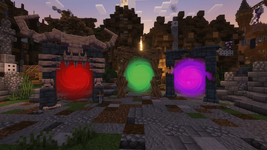
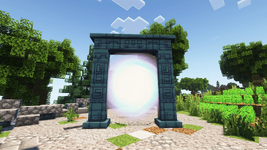
- Basic Portal
- Right-click to open the Portal Menu
- Premade Portal Menu for every portal included!
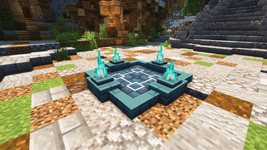
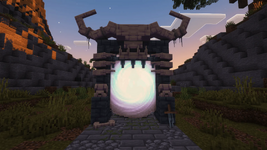
- Sanctuary Portal
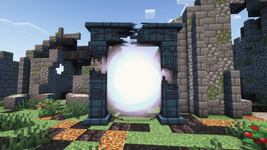
- Dungeon Portal
- Unstable Portal
- Storage Chest
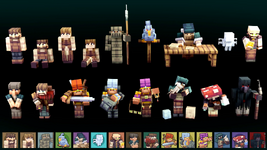
- 18 NPCs:
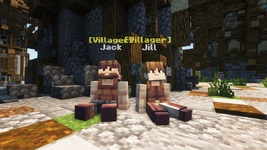
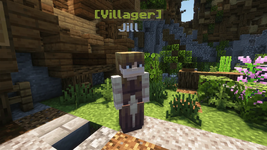
- Villager [M / F]
- Sitting Villager [M / F]
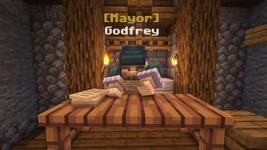
- Mayor
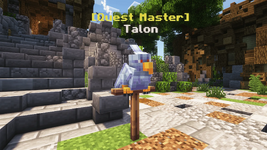
- Quest Master
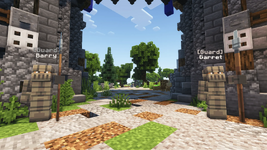
- Guard [Standing / Patrolling]
- Healing Fairy
- Right-click to Heal
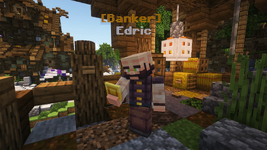
- Banker
- Right-click to open the Bank Menu
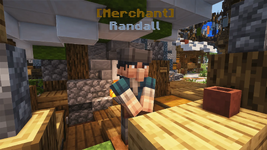
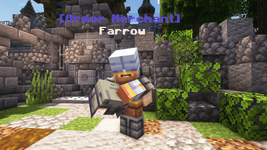
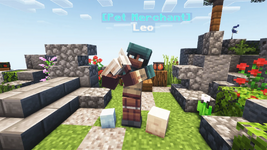
- Basic Merchant
- Right-click to open the Shop Menu
- Premade Shop Menu for every merchant included!
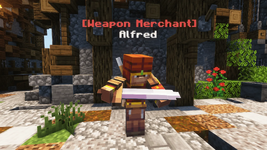
- Weapon Merchant
- Armor Merchant
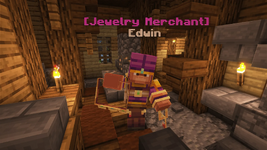
- Jewelry Merchant
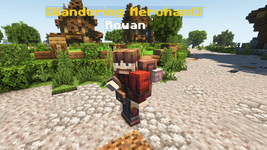
- Wandering Merchant
- Pet Merchant
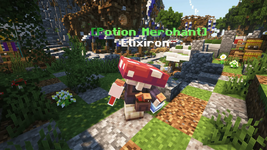
- Potion Merchant
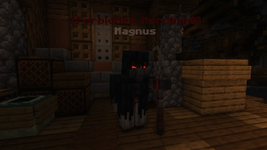
- Forbidden Merchant
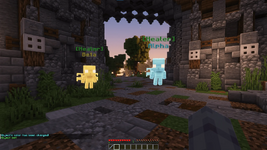
- Interaction animation & Avatar included for every NPC!
- 3 Items:
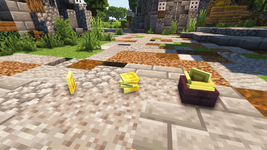
- Coin
- Right-click to Deposit money
- Economy system from EssentialsX has been used in the video
- Stacked Coin
- Coin Bundle
- Coin
- Admin Menu & NPC Edit Tool for Admins
- RPG Essentials | Core Configuration Manual
- Crucible & MMOItems Config (For Items)
- Wandering Merchant Random Spawns Config
- ItemsAdder Config - Easy Drag & Drop!
- Oraxen/Nexo Config - Easy Drag & Drop!
- Instruction on how to install in-game
- NPC name tag support
- Emissive textures
 Object/NPC/Item Functions
Objects, NPCs, Items, and Menus are fully customizable. (Tutorial included in Configuration manual)Storage Chest:
- Right-click to Open Storage.
- /enderchest from EssentialsX has been used in the video.
- Right-click to open the Waypoint Menu.
- Click on waypoints to Teleport after 3 seconds, lock waypoints with custom permission nodes.
- Teleport cancels when you move.
- Right-click to open the Portal Menu.
- Click on locations to Teleport Immediately, lock locations with custom permission nodes.
- Right-click to Heal yourself.
- Right-click to Deposit money to your balance.
- Economy system from EssentialsX has been used in the video.
- Right-click to open the Bank Menu.
- Withdraw money from your balance, changing them into Coin Items.
- Convert Coins to higher value Coin Items, such as converting 64x Coins to 1x Stacked Coin.
- Great way to directly drop money from mobs, trading/giving away money to other players, etc.
- Economy system from EssentialsX has been used in the video.
- Right-click to open the Shop Menu.
- Buy Items or Permission Nodes.
- Sell Items.
Admin Menu & NPC Edit Tool for Admins
- Tired of summoning entities through commands? We offer an Admin Menu where you can click on any Object, NPC, or Item to directly summon them.
- NPCs are a pain to position/rotate. We offer an NPC Edit Tool that only works for server operators, which you can use to easily position, rotate, remove, rename, and recolor Objects and NPCs from the RPG Essentials series.
- Shift + Right-click to enter Edit Mode and carry an NPC to set their position/rotation.
- Left-click to toggle between Name Mode and Color Mode:
- Name Mode: Your chat input will be set as the Object/NPC’s Display Name (If it has one).
- Color Mode: Your chat input will be set as the Object/NPC’s Color (If it has one).
- In Edit Mode, Shift + Right-click the NPC again to remove it.
- Right-click the NPC to set the Object/NPC, exiting the Edit Tool.
Configuration Manual for Server Admins
- Includes a guide document on how to configure the followings:
- Display Name & Color
- How to Change NPC/Object Display Name & Color
- Admin Menu & NPC Edit Tool
- How to Use the Admin Menu
- How to Use the NPC Edit Tool
- Waypoints & Portals
- How to Customize Waypoints & Portals
- Right-click Customization
- How to Customize Right-click Interactions
- Merchant Shop Items
- How to Customize Merchant Shops - Items
- How to Customize Merchant Shops - Permission Nodes
- Patrolling Guards
- How to Customize Patrol Points
- Wandering Merchant Random Spawns
- How to set Random Spawns Mob type, World, Chance, Block, and Biome
- Display Name & Color
Dependencies: MythicMobs, ModelEngine, DeluxeMenus, PlaceholderAPI, Vault, Luckperms
Item Dependencies: MythicCrucible OR MMOItems
Tested on version 1.21.1, MythicMobs (5.7.2), ModelEngine (4.0.7), DeluxeMenus (1.14.1-DEV-196), PlaceholderAPI (2.11.6), Vault (1.7.3), Luckperms (5.4.131), MythicCrucible (2.1.0), MMOItems (6.10), Resource pack included
EssentialsX has been used in the video for the Storage Chest and Economy System.
-
 01JN58ZQ5VJA030ZM4T2V3QQ3X.png
 -
 01JN58ZQ5ZFE4T7557H90Z0C0C.png
 -
 01JN58ZQ6DVM39KKHHRNYYQ1P2.png
 -
 01JN58ZQ6J02BTB343BC1DE7ZQ.png
 -
 01JN58ZQ6BSK72V356CZ5YVZG2.png
 -
 01JN58ZQ6CABXBZDFXEHNMEV4H.png
 -
 01JN58ZQ6F9H5YFVNP1E24TYN8.png
 -
 01JN58ZQ6G60KEQQRS9SJSRX8B.png
 -
 01JN58ZQ6ER4QYHWYSJY49HA78.png
 -
 01JN58ZQ6KXYP3GAWZWY8N7G4K.png
 -
 01JN58ZQ6S3X8SXTF12APGGPVH.png
 -
 01JN58ZQ6NE3ZTQXKC3B9VMB1D.png
 -
 01JN58ZQ6MX2ABZF683T866MC3.png
 -
 01JN58ZQ6TAJTAW549Q5D9B3SW.png
 -
 01JN58ZQ6PEDBFWWA67SPVRF4W.png
 -
 01JN58ZQ6VA6MQ5VZY6863K00M.png
 -
 01JN58ZQ61R8HCKWEKA35K7ZZB.png
 -
 01JN58ZQ6QWKB52JFT8RV0WC68.png
 -
 01JN58ZQ64JSMSBK0JX7V9S3B9.png
 -
 01JN58ZQ68T53QES525A2G0XD0.png
 -
 01JN58ZQ69JJSK9A3G1TXCD5HQ.png
 -
 01JN58ZQ625Y45M1AJRM2RPAVB.png
 -
 01JN58ZQ653N5JQXGQ6W1S3RWJ.png
 -
 01JN58ZQ669VDN5RZ6WD6NEWXR.png
 -
 01JN58ZQ6094PQS0SFGJY6NEZS.png
 -
 01JN58ZQ6799HNZ84RFXAWK6BQ.png

![[Forge Six] RPG Weapon & Tool Megapack](/data/resource_icons/11/11151.jpg?1742064548)
![Nog's Plushies [Superheroes]](/data/resource_icons/11/11150.jpg?1742064316)
![Nog's Plushies [Plumber Pals]](/data/resource_icons/11/11149.jpg?1742064189)
![Nog's Plushies [Dinosaurs]](/data/resource_icons/11/11140.jpg?1742021732)
![[TugkanDeMan] Void Equipment - End Souls](/data/resource_icons/11/11139.jpg?1742020397)