
- VirusTotal Scan
- https://www.virustotal.com/gui/file/5c540197bfaed072f41c06b79de5a5cdc14b8da39ccb43ea6527937bb26d4bac?nocache=1
- Compatible versions
- 4.6, 4.7
IPS applications and plugins require you to extract the .TAR or .XML content from the zip archive before installing.
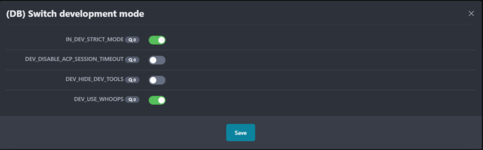
The plugin adds a developer mode toggle button to the ACP panel.
Installation:
1. Make sure you have a constants.php file located in the root of the IPBoard installation
2. Make sure that you downloaded and added Developer Tools to your IPBoard root folder
Developer Tools
Installation:
1. Make sure you have a constants.php file located in the root of the IPBoard installation
PHP:
<?php
define( 'IN_DEV_STRICT_MODE', FALSE );
define( 'DEV_DISABLE_ACP_SESSION_TIMEOUT', FALSE );
define( 'DEV_HIDE_DEV_TOOLS', FALSE );
define( 'DEV_USE_WHOOPS', FALSE );
define( 'IN_DEV', FALSE );
2. Make sure that you downloaded and added Developer Tools to your IPBoard root folder
Developer Tools


![ComplexTurrets | Defend Yourself using Turrets! [1.8-26.2]](/data/resource_icons/1/1230.jpg?1673047672)